Deploying Modular Monoliths: One Codebase, Multiple Services
This post was originally published on my Substack - Backend Engineering Adventures.
Last week, we talked about the anatomy of modular monoliths and how to structure them. But as you start to do that, issues arise, and one of the common question that you might think about but is afraid to ask out loud is: can have an API and a queue consumer in the same service?
And while you’re a free person, in a free world - meaning that you technically can do this - you likely shouldn’t.
I do not recommend deploying as a monolith when you need to have two entrypoints - like a consumer from a queue, a listener from a message broker, an HTTP API, etc. Why? Because mixing different runtime patterns in a single container gets messy fast:
- Your API needs fast response times, your consumer needs long-running stability
- Scaling requirements are completely different
- One crashed consumer shouldn’t take down your API
- Different health check patterns, different deployment strategies (consumer needs to finish processing messages, REST API needs to drain traffic)
You can, though, keep your code as a monolith. As long as you deploy separate services (containers) using the same codebase - and this is fine, unless at some point it starts getting too messy and the services are just exposing too different things and having runtime dependency conflicts - then that’s where you will want to break it down. We won’t be going down that road, and we will just assume things are simple enough that you can stay under the monolithic codebase for a little longer but you do need a separate runtime for this codebase.
Important to notice: PLEASE use your own gut feeling when it comes to using any of these patterns because depending on the complexity of your codebase, it won’t be a good idea - sometimes we try to avoid doing the hard work by doing something that looks simpler but it’s harder to maintain long-term. If you wanna chat about a specific scenario drop me a message!
Deployment Patterns for Modular Monoliths⌗
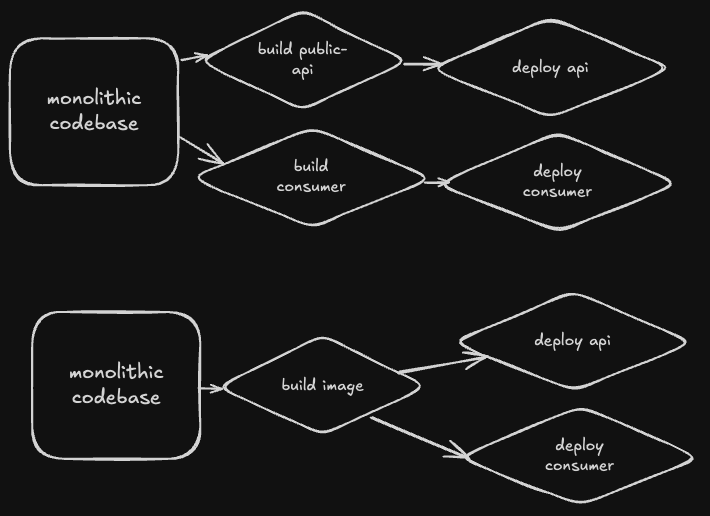
Pattern 1: Same Dockerfile, Different Entrypoints⌗
# Dockerfile
FROM python:3.11
COPY . /app
WORKDIR /app
RUN pip install -r requirements.txt
# Don't specify CMD here - let compose/k8s handle it
# docker-compose.yml
services:
  api:
    build: .
    command: python main_api.py
    ports:
      - "8000:8000"
    environment:
      SERVICE_TYPE: api

  consumer:
    build: .
    command: python main_consumer.py
    environment:
      SERVICE_TYPE: consumer

  scheduler:
    build: .
    command: python main_scheduler.py
    environment:
      SERVICE_TYPE: scheduler
Each service runs from the same image but with different entry points. Simple, clean, and each can scale independently.
Pattern 2: Same Entrypoint, Environment Variable Control⌗
When you want a single entry point that branches based on configuration:
# main.py
import os
from api.server import start_api
from consumers.worker import start_consumer
from scheduler.cron import start_scheduler

def main():
    service_type = os.environ.get('SERVICE_TYPE', 'api')

    if service_type == 'consumer':
        start_consumer()
    elif service_type == 'scheduler':
        start_scheduler()
    else:
        start_api()

if __name__ == "__main__":
    main()
This works great with Kubernetes deployments where you can use the same image with different environment variables:
# k8s-api-deployment.yaml
apiVersion: apps/v1
kind: Deployment
metadata:
  name: myapp-api
spec:
  replicas: 3
  template:
    spec:
      containers:
      - name: api
        image: myapp:latest
        env:
        - name: SERVICE_TYPE
          value: "api"
---
# k8s-consumer-deployment.yaml
apiVersion: apps/v1
kind: Deployment
metadata:
  name: myapp-consumer
spec:
  replicas: 5
  template:
    spec:
      containers:
      - name: consumer
        image: myapp:latest
        env:
        - name: SERVICE_TYPE
          value: "consumer"
Pattern 3: Different Dockerfiles!⌗
Sometimes you need completely different runtime environments for each service. Here’s how to structure it:
deployment/
├── api.Dockerfile
├── consumer.Dockerfile
├── scheduler.Dockerfile
└── docker-compose.yml
Then you can have your CI/CD process build and deploy multiple images. This is useful when, for example, your API runs on python:3.11-slim for fast startup and your consumer needs python:3.11 (full image) for data science libraries.
Handling External Dependencies⌗
For database connections, external API clients, and other shared resources, I use a simple dependency injection pattern that works across all service types. There’s a bunch of ways of doing this, but this is one of them:
# common/shared_services.py
class SharedServices:
    def __init__(self):
        self.db = None
        self.redis = None
        self.payment_client = None
        self.message_broker = None

    def init_app(self, config, service_type):
        # Always needed
        self.db = create_db_connection(config.DB_URL)

        # Service-specific initialization
        if service_type in ['api', 'consumer']:
            self.redis = Redis(config.REDIS_URL)

        if service_type == 'api':
            self.payment_client = StripeClient(config.STRIPE_KEY)

        if service_type == 'consumer':
            self.message_broker = KafkaClient(config.KAFKA_BROKERS)

services = SharedServices()
This way, each service only initializes what it needs. Your API doesn’t connect to Kafka, your consumer doesn’t initialize payment clients.
Keep in mind that since they can use the same Docker image, the libraries will be installed though. This is not a big problem until your images start getting too big, you start to see slower startup times, or when you start having conflicts on dependencies.
Speaking of dependencies…
Managing Dependencies and Conflicts⌗
Here’s the tricky part: different services might need different versions of the same library. Maybe your API needs the latest FastAPI, but your consumer needs an older version of a Kafka client that conflicts.
Solution 1: Separate Requirements Files⌗
requirements/
├── base.txt        # Shared dependencies
├── api.txt         # includes base.txt + API-specific
├── consumer.txt    # includes base.txt + consumer-specific
└── scheduler.txt   # includes base.txt + scheduler-specific
# Dockerfile with build args
ARG SERVICE_TYPE=api
FROM python:3.11
COPY requirements/base.txt requirements/${SERVICE_TYPE}.txt ./
RUN pip install -r ${SERVICE_TYPE}.txt
Solution 2: Optional Dependencies⌗
# setup.py
setup(
    name="myapp",
    install_requires=[
        "sqlalchemy>=2.0",
        "pydantic>=2.0",
    ],
    extras_require={
        "api": ["fastapi>=0.100", "uvicorn"],
        "consumer": ["kafka-python>=2.0", "celery>=5.0"],
        "scheduler": ["apscheduler>=3.0"],
    }
)
Then install what you need:
pip install myapp[api]  # For API service
pip install myapp[consumer]  # For consumer service
Configuration Management⌗
Each service type needs different configs. Here’s a pattern that works well:
# config.py
import os
from dataclasses import dataclass

@dataclass
class BaseConfig:
    DB_URL: str = os.environ.get('DB_URL')
    LOG_LEVEL: str = os.environ.get('LOG_LEVEL', 'INFO')

@dataclass
class APIConfig(BaseConfig):
    PORT: int = int(os.environ.get('PORT', 8000))
    RATE_LIMIT: int = int(os.environ.get('RATE_LIMIT', 100))
    STRIPE_KEY: str = os.environ.get('STRIPE_KEY')

@dataclass
class ConsumerConfig(BaseConfig):
    KAFKA_BROKERS: str = os.environ.get('KAFKA_BROKERS')
    CONSUMER_GROUP: str = os.environ.get('CONSUMER_GROUP')
    MAX_BATCH_SIZE: int = int(os.environ.get('MAX_BATCH_SIZE', 100))

def get_config(service_type: str):
    configs = {
        'api': APIConfig,
        'consumer': ConsumerConfig,
    }
    return configs.get(service_type, BaseConfig)()
Tooling⌗
Pants and Bazel are two tools that help with dependency management, too. While aimed at a monorepos (which is a whole different topic that we can cover… on a whole different series) I can see them being applied in a project like this to build different Dockerfiles with different dependencies.
When This Pattern Breaks Down⌗
This approach works beautifully until it doesn’t. Here are the signs it’s time to actually split the codebase:
- Dependency conflicts become unmanageable - You’re spending more time juggling versions than writing features
- The codebase is 90% irrelevant to each service - Your API imports are 10% of what the consumer uses
- Different teams, different velocities - The API team ships daily, the consumer team monthly
- Language preferences emerge - Maybe that consumer really would be better in Go
Have you tried deploying a monolith as multiple services? What patterns worked for you? Drop a comment below - I’d love to hear about your experiences!
Next Week⌗
In the next post, we’ll tackle the database layer - how to keep your data modular when everything’s in one database, why foreign keys might be your enemy, and the magic of separate schemas.
The patterns I’ll share have saved me from countless “we need to spin up a new database” conversations (with others and with myself!). See you next week!